OpenAI Responses API Tool Calling
Overview
You can use this Snap to provide external tools for the model to call, supplying internal data and information for the model's responses.
- This is a Transform-type Snap.
 Works in Ultra Tasks
Limitations
- The Previous response ID cannot be used in an organization that enables Zero Data Retention since the response will not be stored. Learn more.
- Feature availability may vary by model. For instance, some models, such as reasoning models, do not support web search. Learn more
Snap views
| Type | Description | Examples of upstream and downstream Snaps |
|---|---|---|
| Input | This Snap has one document input view, typically carrying the input message for the OpenAI model. | |
| Output | This Snap has exactly two document output views. The first one outputs the full response from the model. The second one outputs the list of tools to call. It includes a JSON argument, whose value is a JSON object derived from converting the string-formatted argument of the model's response tool call. | |
| Learn more about Error handling. | ||
Snap settings
- Expression icon (
 ): Allows using
JavaScript syntax to access SnapLogic Expressions to set field values dynamically (if
enabled). If disabled, you can provide a static value. Learn more.
): Allows using
JavaScript syntax to access SnapLogic Expressions to set field values dynamically (if
enabled). If disabled, you can provide a static value. Learn more. - SnapGPT (
 ): Generates SnapLogic Expressions
based on natural language using SnapGPT. Learn
more.
): Generates SnapLogic Expressions
based on natural language using SnapGPT. Learn
more. - Suggestion icon (
 ): Populates a
list of values dynamically based on your Snap configuration. You can select only one
attribute at a time using the icon. Type into the field if it supports a comma-separated
list of values.
): Populates a
list of values dynamically based on your Snap configuration. You can select only one
attribute at a time using the icon. Type into the field if it supports a comma-separated
list of values. - Upload
 : Uploads files. Learn more.
| Field/Field set | Type | Description |
|---|---|---|
| Label | String |
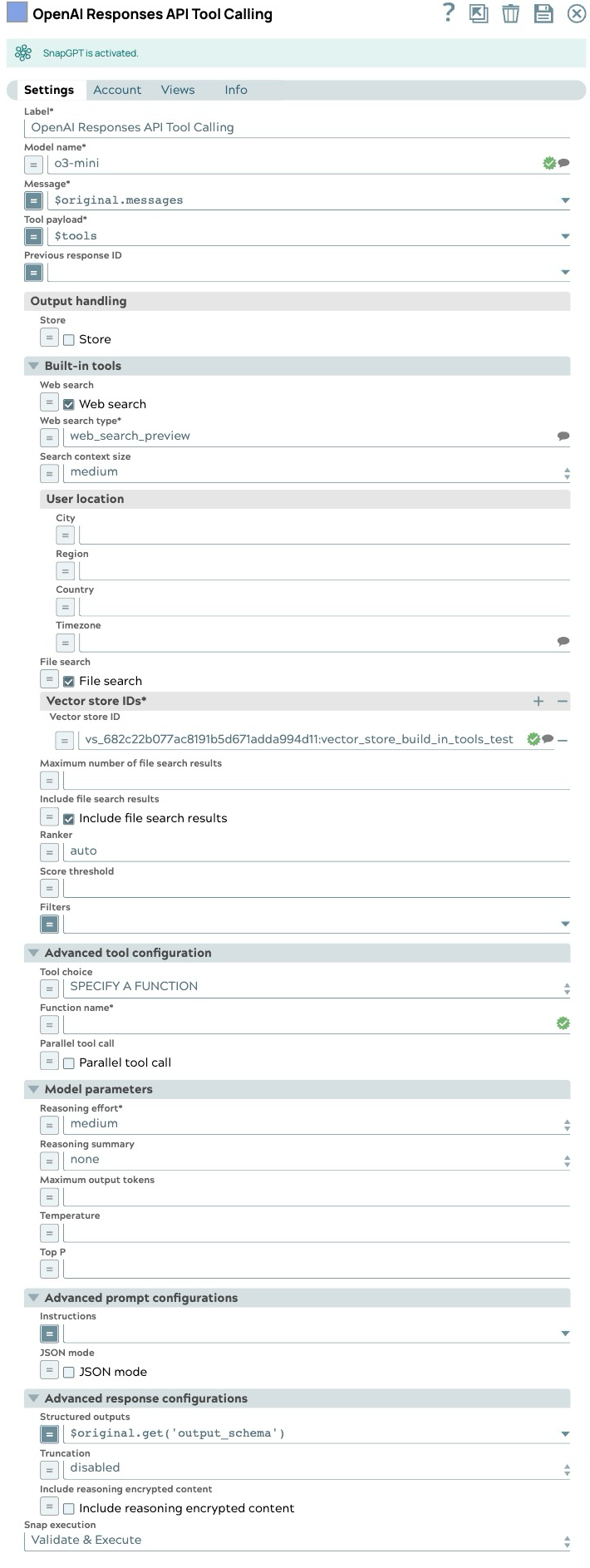
Required. Specify a unique name for the Snap. Modify this to be more appropriate, especially if more than one of the same Snaps is in the pipeline. Default value: OpenAI Responses API Tool Calling Example: Tool Caller |
| Model name | String/Expression/ Suggestion |
Required. The model name to use for the responses API. Default value: N/A Example: gpt-4o |
| Message | String/Expression |
Required. Specify the message string or list of input items to send as input to the responses endpoint. Default value: N/A Example: $inputMessage |
| Tool payload | String/Expression |
Required. Specify the list of tool definitions to send to the model. Default value: N/A Example: $specifiedTools |
| Previous response ID | String/Expression |
The unique ID of the previous response to the model. Use this to create multi-turn conversations. Default value: N/A Example:resp_685bd91eed58819898936ac8a0ba237e05433b6b77d284a7 (expression) |
| Output handling |
Settings for response output management. |
|
| Store | Checkbox/Expression |
Indicate whether to store or not store the generated model response. Default status: Selected |
| Built-in tools |
Configure the built-in tools to be used |
|
| Score threshold | Decimal/Expression |
The score threshold for the file search, a number between 0 and 1. Numbers closer to 1 will attempt to return only the most relevant results, but may return fewer results. Default value: N/A Example: 0.7 |
| Web search | Checkbox/Expression |
Select this checkbox to allow model to search the web for the latest information. Default status: Deselected |
| Web search type | String/Expression/ Suggestion |
Required. Select the type of web search tool. Default value: web_search_preview Example: web_search_preview |
| Search context size | Dropdown list/Expression |
High level guidance for the amount of context window space to use for the search.
|
| File search | Checkbox/Expression |
Select this checkbox to allow the model to search the files. Default status: Deselected |
| User location | String/Expression |
An approximate user location to refine search results based on geography. Default value: N/A Example: |
| Include file search results | Checkbox/Expression |
Select this checkbox to include the file search results in the response. Default status: Deselected |
| Maximum number of file search results | Integer/Expression |
The maximum number of file search results to return. This number should be between 1 and 50 Default value: N/A Example: 25 |
| Ranker | String/Expression |
The ranker to use for the file search. Default value: autoExample: auto |
| Filters | String/Expression |
The filters to apply to the file search. Default value: N/A Example:(expression) {"type": "eq", "key":
"Region", "value": "US"} |
| Vector store IDs | String/Expression |
Required. The IDs of the vector stores to be used. Default value: N/A Example:"vs_682c22b077ac8191b5d671adda994d11" |
| Advanced tool configuration |
Modify the tool call settings to guide the model responses and optimize output processing. |
|
| Tool choice | Dropdown list/Expression |
Controls which (if any) tool is called by the model.
Example: AUTO |
| Function name | String/Expression |
Required. The name of the function to force the model to call. Default value: N/A Example: get_weather |
| Built-in tool | Dropdown list/Expression |
Required. Select built-in tool to be used
Default value: N/A Example: Web Search |
| Parallel tool call | Checkbox/Expression |
Select this checkbox to enable parallel tool calling. Default status: Selected |
| Model parameters |
Parameters used to tune the model runtime. |
|
| Temperature | Decimal/Expression |
The sampling temperature to use, a decimal value between 0 and 2. If left blank, the endpoint uses its default value. Default value: N/A Example: 0.2 |
| Reasoning effort | Dropdown list/Expression |
Required. Reasoning effort level for the selected model. Currently supported only for OpenAI o-series models.
Example: medium |
| Reasoning summary | Dropdown list/Expression |
A summary of the reasoning performed by the model. This can be useful for debugging and understanding the model's reasoning process.
Example: none |
| Maximum output tokens | Integer/Expression |
Maximum number of tokens that can be generated for a response, including visible output tokens and reasoning tokens. If left blank, the endpoint uses its default value. Default value: N/A Example: 200 |
| Top P | Decimal/Expression |
Nucleus sampling value, a decimal value between 0 and 1. If left blank, the endpoint uses its default value. Default value: N/A Example: 0.2 |
| Advanced prompt configurations |
Modify the prompt settings to guide the model responses and optimize output processing. |
|
| Instructions | String/Expression |
Specify the persona for the model to adopt in its responses. When using along with previous response ID, the instructions from a previous response will not be carried over to the next response. Default value: N/A Example: Provide concise, bullet‑point answers |
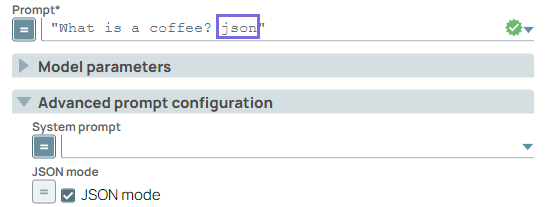
| JSON mode | Checkbox/Expression |
Select this checkbox to enable the model to generate strings that can be parsed
into valid JSON objects. The output includes the parsed JSON object in a field named json_output that contains the data.
Note:
Default status: Deselected |
| Advanced response configurations |
Modify the response settings to customize the responses and optimize output processing. |
|
| Structured outputs | String/Expression |
Ensures the model always returns outputs that match your defined JSON Schema. Default value: N/A Example: $response_format.json_schema |
| Truncation | Dropdown list/Expression |
The truncation strategy to use for the model response.
|
| Include reasoning encrypted content | Checkbox/Expression |
Select this checkbox to include an encrypted version of reasoning tokens in the output. This allows reasoning items to be used when store is false. Default status: Deselected |
| Snap execution | Dropdown list |
Choose one of the three modes in
which the Snap executes. Available options are:
Default value: Validate & Execute Example: Execute only |