


Migrate an API version
POST https://{controlplane_path}/api/1/rest/public/apim/migrate_version/{version_path} This API migrates an API version, including the selected asset types, to another version.
The destination version can be in the same or another API, Project, Environment/Org, or Snaplex.
Prerequisites
- Read access to the source project
- Write access to the target Org
Path parameters
| Key | Description |
|---|---|
controlplane_path |
Required. The path to the SnapLogic control plane:
elastic.snaplogic.com
For the UAT or EMEA control plane, substitute the name for elastic. For
example:
|
version_path |
Required. The path of the source API version.
Format: Example: |
Query parameters
None.
Request header
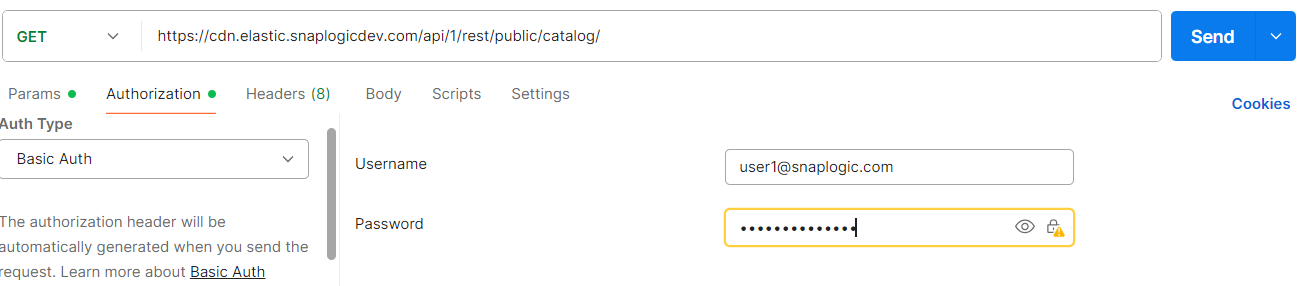
In the request header, specify Basic for authorization, add your credentials (Login and password of your SnapLogic user or service account), and specify application/json for content type.
For more details on accounts refer to Manage accounts.
Authorization: Basic {base64_encoded <email>:<password>}
Content-Type: application/json
Example of Basic authentication using Postman
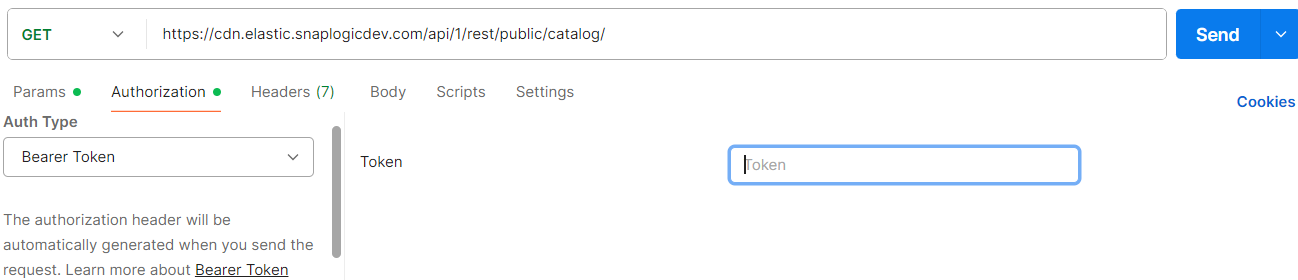
When using JWT authentication, the API requests includes specific headers. In the
request header, specify Bearer Token for authorization, add the token,
and specify application/json for content type. These headers are
automatically added when you configure bearer token authentication in your API client.
The authorization header contains the word Bearer followed by a
space and your JWT token.
Authorization: Bearer Token {token}
Content-Type: application/json
Example of JWT authenthication using Postman
Request body
 {
  "dest_version_path" : "...",
  "dest_plex_path" : "...",
  "asset_types" : [ ... ],
  "duplicate_check" : true,
  "async_mode" : true
}
| Key | Type | Description |
|---|---|---|
dest_version_path |
string |
The path to the destination API version.
Format: |
dest_plex_path |
string |
The path to the destination Snaplex.
Format: |
asset_types |
array | The list of asset types to migrate.
Valid values:
Default: All valid asset types. Important:
If you are migrating or copying accounts or policies to a different Environment/Org,
|
duplicate_check |
Boolean |
If If Default: |
async_mode |
Boolean | If true, the migration is done asynchronously.
A response is immediately returned with Default: |
Response
 {
  "response_map": {
    "successful": [
      {
        "snode_id": "...",
        "name": "..."
      },
      ...
    ],
    "failed": [ ... ],
    "warnings": [ ... ]
  },
  "http_status_code": 200
}
| Key | Type | Description |
|---|---|---|
successful |
array | An array of objects containing information about assets that were successfully migrated. |
failed |
array | An array of objects containing information about assets that were not migrated. |
warnings |
array | An array of warnings encountered during the migration. |
snode_id |
string | The ID of the asset in the destination JCC node. |
name |
string | The name of the copied asset. |