


Snowflake - Snowpipe Streaming
Overview
You can use this Snap to insert data into Snowflake using the Snowpipe Streaming API, which
enables the continuous ingestion of data into Snowflake tables as and when it is available.
Note: The Snowpipe Streaming Snap uses the role defined in the account URL
properties field. If a role is not defined, the Snap runs a
SELECT
            CURRENT_ROLE()
to determine a suitable role, failing which it falls back to the
PUBLIC role.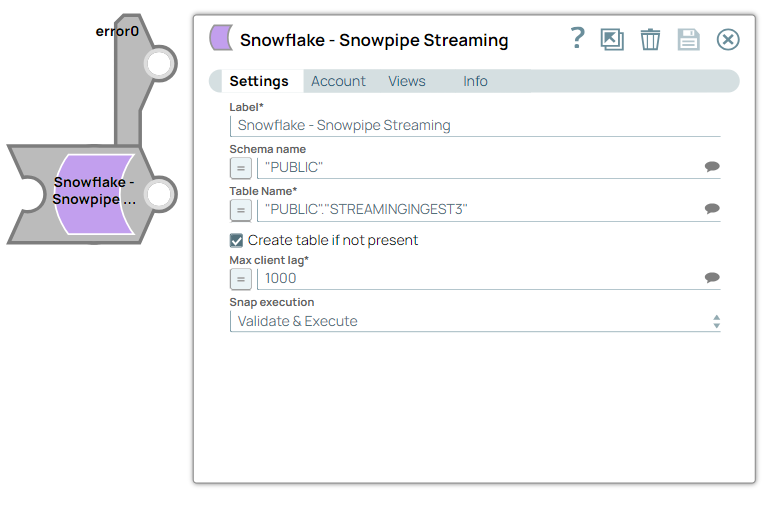
 Write-type Snap
-
 Works in Ultra Tasks
Prerequisites
- Valid Snowflake KeyPair or OAuth 2.0 account.
- A valid account with the required permissions.
Snap views
| Type | Description | Examples of upstream and downstream Snaps |
|---|---|---|
| Input | Requires the table name where the data has to be inserted and the data flush interval (milliseconds) in which the data is pushed to the database. | |
| Output | Inserts data in Snowflake tables in specified intervals. | |
| Learn more about Error handling. | ||
Snap settings
Legend:
- Expression icon (
 ): Allows using
JavaScript syntax to access SnapLogic Expressions to set field values dynamically (if
enabled). If disabled, you can provide a static value. Learn more.
): Allows using
JavaScript syntax to access SnapLogic Expressions to set field values dynamically (if
enabled). If disabled, you can provide a static value. Learn more. - SnapGPT (
 ): Generates SnapLogic Expressions
based on natural language using SnapGPT. Learn
more.
): Generates SnapLogic Expressions
based on natural language using SnapGPT. Learn
more. - Suggestion icon (
 ): Populates a
list of values dynamically based on your Snap configuration. You can select only one
attribute at a time using the icon. Type into the field if it supports a comma-separated
list of values.
): Populates a
list of values dynamically based on your Snap configuration. You can select only one
attribute at a time using the icon. Type into the field if it supports a comma-separated
list of values. - Upload
 : Uploads files. Learn more.
| Field/Field set | Type | Description |
|---|---|---|
| Label | String | Required. Specify a unique name for the Snap. Modify this to be more appropriate, especially if there are more than one of the same Snap in the pipeline. |
| Schema Name | String/Expression/ Suggestion | Specify the database schema name. Default value: N/A Example: "PUBLIC" |
| Table Name | String/Expression/ Suggestion | Required. Specify the table name on which the insert
operation has to be executed. Default value: N/A Example: “PUBLIC”.”SNOWPIPESTREAMING” |
| Create table if not present | Checkbox | Select this checkbox if you want the table to be automatically created if it
does not already exist. Default status: Deselected |
| Max client lag | Integer/Expression | Specify the client data flush interval in milliseconds. Adjust this value based
on the maximum latency your target system can handle (60,000 ms). Note: This field
also accepts inputs in n-second and n-minute formats. Maximum value
is 10 minutes. Default value: 1000 Example: 1500 Max Value: 60,000 |
| Snap execution | Dropdown list | Choose one of the three modes in which the Snap executes. Available options
are:
|
Troubleshooting
Schema name not found
The schema name is required for Snowpipe Streaming.
PProvide a schema name in the Snap configuration.